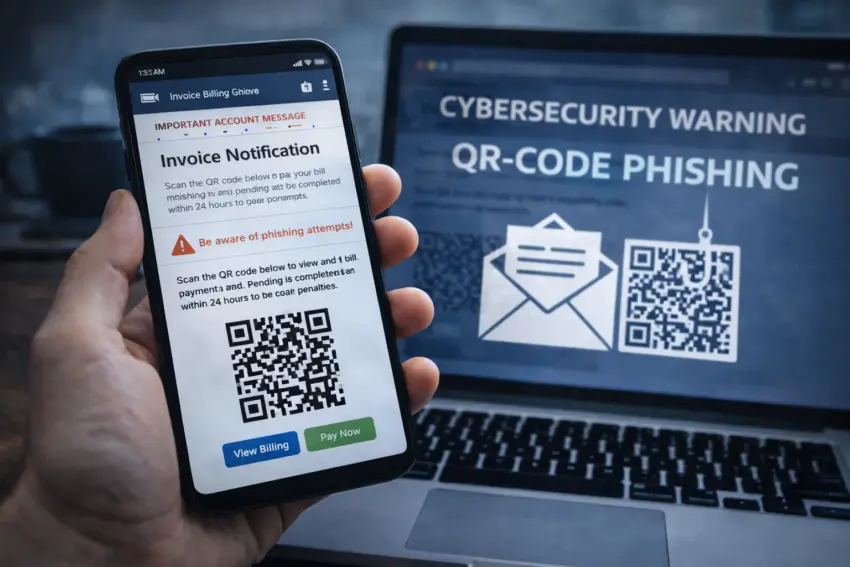
Cybersecurity agencies are warning businesses and consumers about a renewed wave of QR-code phishing, a tactic increasingly seen in billing and invoice emails. The approach, often called “quishing,” attempts to bypass traditional email security filters by embedding malicious links inside QR codes rather than clickable URLs. Recipients who scan the code with a phone are redirected to convincing login pages or payment portals designed to steal credentials, banking details, or multifactor authentication codes.
Security teams say the campaign pattern is especially effective because billing messages create urgency and because people frequently use mobile devices to check invoices. Attackers exploit that behavior by presenting a QR code as the “fastest way” to view a bill, confirm a payment, or resolve an “account issue.”
How QR-code phishing works
In typical cases, the email claims to be from a known service provider, logistics company, tax portal, telecom operator, or software vendor. The message often includes an invoice number, a due date, and a QR code labeled “View invoice,” “Pay now,” or “Verify account.” Once scanned, the victim is taken to a site that imitates a legitimate brand and prompts for credentials or payment information.
Cybersecurity agencies note that QR codes are not inherently dangerous, but they are easy to misuse because the destination URL is hidden until after scanning. On mobile devices, the user may also be outside the protection of corporate web filters and endpoint tools that are more common on laptops.
Why billing emails are a prime target
Billing and invoicing messages are among the most trusted email categories in workplaces, and many teams process them quickly to avoid late fees or service interruptions. Attackers take advantage of routine workflows, especially in accounts payable and procurement. In small companies, a single mailbox may handle multiple vendors, making it easier for a fake invoice to blend in.
Some attacks also use “thread hijacking,” where criminals reply inside an existing email chain after compromising a legitimate account, then introduce a QR code as a “new payment method” or “updated invoice access.”
Common warning signs
Agencies advise users to treat unexpected QR codes in emails as suspicious, particularly when the message asks for immediate action. Frequent indicators include:
- Unexpected QR codes in invoices or payment reminders that previously used normal links or attachments.
- Pressure tactics such as “final notice,” “account will be suspended,” or “payment overdue” language.
- Unusual sender details (lookalike domains, odd reply-to addresses, or mismatched display names).
- Generic greetings and vague descriptions of the service or purchase.
- Requests to re-authenticate to view a bill, especially for common services like Microsoft 365, banking, or delivery portals.
- Changes to bank details or payment instructions, including new IBANs or payment providers.
What to do before scanning
Security authorities recommend verifying invoices through trusted channels rather than through a QR code received by email. For consumers, that usually means opening the provider’s app or typing the official website address manually. For businesses, it means checking vendor details against internal records and confirming changes to payment instructions via a phone number already on file.
If scanning is unavoidable, users should preview the link destination before opening it. Many phone cameras and QR scanner apps show the URL. Users can also paste the link into a safe browser environment or a security scanning service approved by their organization.
“A QR code is a link you can’t see. Treat it like a short URL: verify the sender and the destination before you proceed.”
Steps organizations can take
Agencies advise organizations to update email and awareness programs to address QR-based threats specifically. Practical steps include:
- Invoice verification rules that require secondary confirmation for new payment methods or banking changes.
- Mobile security controls for staff who process invoices from phones, including managed browsers and device policies.
- QR code detection in email gateways where available, with warnings or sandbox analysis of extracted URLs.
- Stronger authentication, including phishing-resistant MFA for finance and admin accounts.
- Clear reporting channels so employees can forward suspicious billing emails to IT security quickly.
What to do if you scanned or entered data
Anyone who scanned a suspicious QR code and entered credentials should change passwords immediately, enable stronger MFA where possible, and notify the relevant service provider and their organization’s IT team. If payment details were provided or a transfer was made, victims should contact their bank as quickly as possible to attempt to halt or recall the transaction.
Cybersecurity agencies emphasize that quishing campaigns are likely to continue evolving. As email filters improve at spotting malicious links, attackers will keep searching for formats—like QR codes—that obscure destinations and push victims onto less protected devices.